
Geo-Targeted Keywords: How to Win in Your City
Ever wonder why “dentist near me” searches show everyone but you?
That’s because your site isn’t optimized for geo-targeted keywords — the terms Google uses to connect local intent with local businesses.
In 2026, patients will rely more than ever on hyper-local searches. They’re not just looking for “a dentist.” They’re looking for the best dentist in [their city].
If you’re not using the right city-based and neighborhood keywords across your site, you’re invisible to them.
Key Takeaways
- Geo-targeted keywords include a service + location, e.g., “teeth whitening Gilbert.”
- These keywords help your practice rank for “near me” and city-based searches.
- Add them naturally in titles, headers, and meta descriptions.
- Create dedicated city-specific pages for each service area.
- Local SEO + geo-keyword optimization = more patients close to you.

See How Our Agency Can Help You Attract More Patients
- SEO — dominate Google and Local Map searches.
- Website Design — convert traffic into booked appointments.
- Content Marketing — we create content that gets traffic.
Why Geo-Targeted Keywords Matter for Dental SEO
Here’s a little secret: “Dentist near me” isn’t really what people search for. It’s how they start — but Google automatically substitutes their city name into the query.
So instead of “dentist near me,” your potential patient is actually searching:
- “Family dentist in Gilbert AZ”
- “Cosmetic dentist in Queen Creek”
- “Kids dentist near SanTan Village”
If your website doesn’t include those local phrases, Google has no reason to show your practice.
According to BrightLocal, 92% of consumers choose a local business from the first page of results — and 78% of local searches lead to an offline purchase or appointment.
Geo-targeted keywords are what get you on that first page.
If you want to capture nearby search traffic, combine these phrases with the strategies from How to Rank for “Near Me” Searches.
What Are Geo-Targeted Keywords?
Geo-targeted keywords combine your service with your location, helping Google understand exactly where you’re relevant.
Examples for Dental Practices:
| Dental Service | Geo-Targeted Keyword Example |
| Pediatric Dentistry | Pediatric Dentist Gilbert AZ |
| Cosmetic Dentistry | Teeth Whitening in Chandler |
| Implants | Dental Implants Queen Creek |
| Emergency Services | 24-Hour Dentist Near Mesa |
| Orthodontics | Invisalign for Teens Gilbert |
Each keyword tells Google: “This business offers [service] in [location].”
Without that clarity, your competitors who include city names in their titles and copy will always outrank you.
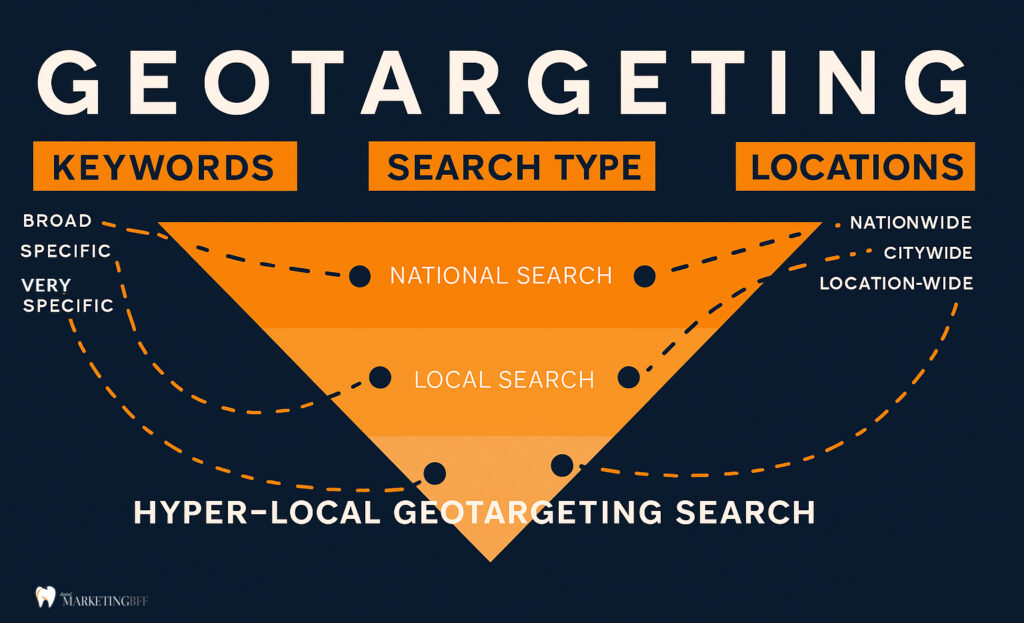
We can drill down even further with hyper-local keywords. These drill down beyond the city to specific neighborhoods, landmarks, or micro-areas that locals actually use in searches. For example:
- “emergency dentist near SanTan Village”
- “kids dentist by Higley High School”
- “cosmetic dentist in Agritopia Gilbert”
These types of keywords capture patients searching within a 1–3 mile radius and help your Google Business Profile and local landing pages rank higher for “near me” and map pack results.
Here’s an example for Broad, Specific and Very (Hyper) Specific:
Broad Keyword: “dentist”
Specific Local Keyword: “family dentist in Gilbert AZ”
Hyper-Local Keyword: “pediatric dentist near Power Ranch Gilbert”
How to Find the Best Geo Keywords for Your Dental Practice
1. Start with Your Primary City
Identify your core service area (e.g., Gilbert, AZ).
Use tools like Ubersuggest, Google Keyword Planner, or BrightLocal to find popular variations of your services combined with your city name.
2. Expand to Nearby Suburbs
If you serve multiple areas, build separate service area pages for each. Example: /locations/dentist-in-queen-creek/
Once you’ve chosen your city and neighborhood terms, put them into action with How to Create Location Pages That Actually Rank.
3. Analyze Competitors
Search your target phrases (like “cosmetic dentist Chandler”) and review which competitors rank. Note their title tags, headings, and word count.
4. Use Google’s Auto-Suggest
Start typing “dentist in…” and note which cities and neighborhoods Google fills in — those are your most-searched phrases.
5. Don’t Forget Neighborhoods and Landmarks
If your office is near SanTan Mall or the Riparian Preserve, include those identifiers in your copy.
Where to Use Geo-Targeted Keywords on Your Site
1. Title Tags
Include your service + city: “Family Dentist in Gilbert, AZ | [Practice Name]”
2. Meta Descriptions
Add location info naturally: “Looking for a pediatric dentist in Gilbert? We make visits easy, fun, and stress-free for kids.”
3. Headers (H1–H3)
Use variations of your main city keyword naturally throughout subheadings.
4. On-Page Content
Work your city and services into paragraph copy naturally — avoid keyword stuffing.
5. Internal Links
Connect your city-specific pages using descriptive anchors:
6. Footer and Contact Page
Always include your full address and embedded Google Map for local reinforcement.
10 Geo-Keyword Optimization Tips for Dentists
- Create one location page per city you serve.
- Add your city name to your homepage title and H1.
- Use service + city combinations throughout your site.
- Include local images (office exterior, landmarks).
- Add reviews mentioning your city.
- Optimize Google Business Profile with matching city keywords.
- Use local schema markup for your address and phone.
- Update meta descriptions for all service pages with geo terms.
- Embed your Google Map and directions on key pages.
- Write blogs targeting seasonal or city events (“Back-to-School Dental Tips for Gilbert Families”).
Common Mistakes to Avoid
- Keyword stuffing city names unnaturally.
- Using one general “Arizona Dentist” page instead of city pages.
- Ignoring small nearby suburbs.
- Forgetting to update meta data with city names.
- Leaving inconsistent NAP details on directory listings.
Google rewards natural local optimization — not repetition.
Advanced Tip: Use Geo Pages to Capture More Service Areas
If you serve multiple nearby cities, build “City + Service” pages that each target unique keywords.
Example Structure:
- /locations/dentist-in-gilbert/
- /locations/dentist-in-queen-creek/
- /locations/dentist-in-mesa/
Each page should include:
- A local intro paragraph mentioning landmarks
- Patient reviews from that area
- Local schema markup
- Internal links to related services
FAQs
Conclusion: Own Your City with the Right Geo Keywords
If your dental website doesn’t speak your city’s language, Google won’t show it to local patients. Geo-targeted keywords bridge that gap — telling search engines exactly where you serve and who you serve.
By naturally including your city and service terms in your titles, content, and metadata, you’ll capture high-intent searches from nearby patients ready to book.
Ready to dominate your city’s search results and outrank local competitors? Book a Free Dental SEO Strategy Call →
