
How to Create Dental Service Area Pages That Convert
Most dental websites make one big mistake: They talk about their services, but not about their locations.
If you want to show up when someone searches “dentist near me” or “Invisalign Gilbert,” you can’t just rely on your homepage. You need dedicated, optimized dental service area pages — each tailored to a specific city or region you serve.
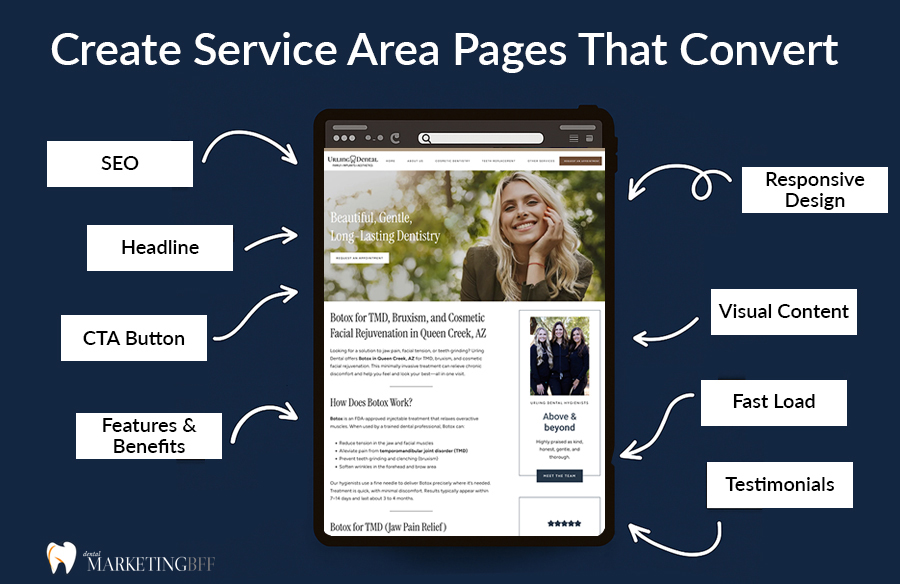
Done right, these pages act as mini homepages that dominate local search results and convert searchers into booked appointments.
Let’s break down exactly how to build service area pages that both rank and convert.
Key Takeaways
- Service area pages target each city you serve — essential for ranking in local searches.
- Each page should include unique local content, not copy-paste text.
- Blend SEO signals (keywords, schema, internal links) with conversion tactics (testimonials, CTAs, maps).
- Add patient trust elements like Google Reviews and photos.
- These pages can capture “near me” traffic without running paid ads.

See How Our Agency Can Help You Attract More Patients
- SEO — dominate Google and Local Map searches.
- Website Design — convert traffic into booked appointments.
- Content Marketing — we create content that gets traffic.
Why Service Area Pages Matter for Dentists
Think of each service area page as your practice’s local ambassador online.
When someone searches “dentist in Queen Creek”, Google wants to show the most relevant, nearby, and trustworthy option. If you don’t have a page dedicated to Queen Creek — with content mentioning that city, a map, and local reviews — Google has no reason to show your site.
Creating multiple service area pages allows you to:
- Rank in multiple cities or ZIP codes
- Build local relevance for “near me” searches
- Increase calls and appointment bookings
Step 1: Identify Your Primary Service Areas
Start by mapping out your geographic reach.
For example, if your practice is in Queen Creek, your surrounding cities might include:
- Chandler
- Gilbert
- Mesa
- Tempe
- Apache Junction
Each one can have its own dedicated page.
BFF Pro Tip: Don’t make “thin” pages with 100 words and the same copy. Each city deserves unique, valuable content that answers local intent.
If you’re still choosing which cities or neighborhoods to target, follow Geo-Targeted Keywords: How to Win in Your City.
Step 2: Use Geo-Targeted Keywords
Your service area pages should target both service and city keywords.
Example Keyword Combinations:
- “Cosmetic Dentist in Queen Creek AZ”
- “Teeth Whitening Gilbert”
- “Invisalign Queen Creek”
- “Emergency Dentist Near Mesa”
Include the main keyword in:
- Title tag
- Meta description
- H1 heading
- 1–2 subheadings
- Image alt text
But always write naturally. Over-optimizing with city names can hurt readability and SEO.
Step 3: Follow a Proven Page Structure
Here’s a high-performing layout for local dental service pages:
H1: [Service] in [City, State]
Intro Paragraph: Establish trust + local reference
H2: Why [City] Patients Choose Us
- Localized details, staff mentions, or area landmarks
H2: Our [Service] Options
- Bullet or grid of related procedures
H2: What to Expect at Your Visit
- Patient comfort, process, or FAQs
H2: Meet Your [City] Dental Team
- Photo and bios of local providers
H2: Directions & Contact Info
- Google map embed, phone number, call-to-action
H2: Frequently Asked Questions
- Include FAQ schema markup
This format helps with both SEO (keyword clustering) and conversion (trust signals).
Pair your service area pages with strong supporting content — try these ideas: Blog Post Ideas That Improve Dental SEO.
Step 4: Add Local Elements to Boost Relevance
Google loves geo-specific context. Don’t just say you serve Queen Creek — prove it.
Include:
– Local landmarks (“Our office is 2 minutes from the Vineyard Towne Center.”)
– Nearby neighborhoods or schools (“We serve patients from Gilbert, Mesa, and downtown Chandler.”)
– Photos of your actual building or signage
– An embedded Google Map
The more local data you include, the stronger your local SEO signals become.
Step 5: Build Each Page to Convert
Getting clicks is great — but your goal is to book appointments.
To convert visitors:
- Add trust signals: Google Reviews, before-and-after photos, video testimonials.
- Place clear CTAs after every major section (“Book Your Appointment in Chandler Today”).
- Include contact buttons above the fold.
- Display office hours and insurance logos.
Example CTA: “Ready to smile brighter, Queen Creek? Call us today at (480) 555-1234 or schedule your visit online.”
Testimonials can dramatically increase conversions on location pages. Use the tips in How to Use Patient Testimonials in SEO.
Step 6: Link Between Cities and Core Services
Each city page should link to:
- Your main keyword pillar page (/queen-creek-dentist/)
- Related service pages (/services/)
- Neighboring city pages (“Looking for a dentist in Queen Creek? Click here.”)
This builds a web of internal relevance and improves crawlability.
Step 7: Add Schema for Each Location
Use LocalBusiness schema to tell Google about each location. It includes your name, address, phone number, hours, and coordinates.
<script type="application/ld+json">

{

"@context": "https://schema.org",

"@type": "LocalBusiness",

"name": "XYZ Pediatric Dentistry",

"image": "https://xyzdentalaz.com/images/office.jpg",

"address": {

"@type": "PostalAddress",

"streetAddress": "1122 E. James St.",

"addressLocality": "Queen Creek",

"addressRegion": "AZ",

"postalCode": "85140"

},

"telephone": "(480) 555-1122",

"openingHours": "Mo-Fr 8:00-17:00"

}

</script>
Step 8: Include FAQ Content on Every Service Area Page
Adding FAQs helps target conversational and AI-related searches.
Example:
Q: Do you accept Delta Dental insurance in Queen Creek?
A: Yes! We’re proud to accept Delta Dental and several PPO plans to make dental care affordable for Queen Creek families.
Use 3–5 FAQs per page and apply FAQ schema.
Step 9: Track and Optimize Your Local Pages
Use Google Search Console and Google Analytics to measure performance. Track:
- Clicks and impressions by city keyword
- Call-to-action conversions
- Map click activity
Pages that rank but don’t convert likely need stronger CTAs or trust elements.
Common Mistakes to Avoid
❌ Copying the same text across every city page
❌ Forgetting to update city names in metadata
❌ Using stock photos instead of local images
❌ Not linking between city pages
❌ Ignoring schema markup
Every page should feel like a unique micro-site designed for that city’s audience.
FAQs
Conclusion: Turn Every City You Serve into a Source of New Patients
Your homepage can’t do all the heavy lifting — localized service area pages are how you capture “near me” searches and turn them into real appointments. When each city page includes unique, keyword-optimized content, authentic local details, and conversion-focused design, Google recognizes your authority — and patients recognize your proximity.
Every city deserves its own digital front door. Build pages that speak to local families, showcase your expertise, and make booking effortless.
Ready to dominate your local market with high-converting service area pages? Book a Free Dental SEO Strategy Call →
