
How to Create Location Pages That Actually Rank
Ever searched “dentist in [city]” and noticed your competitors have separate pages for each location — and they’re outranking you?
That’s no accident. Those are location pages, and when they’re done right, they dominate local search results.
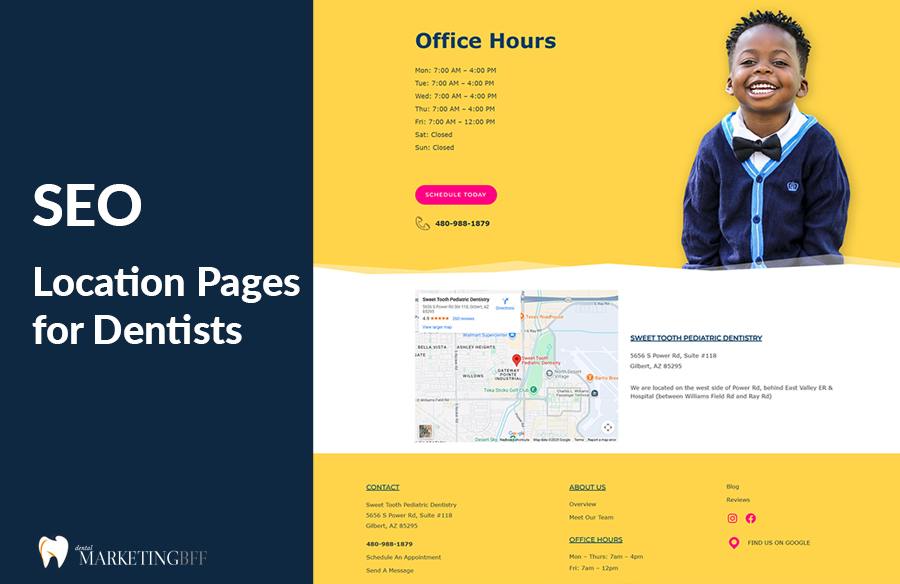
If you have multiple offices or serve multiple nearby cities, creating city-specific location pages helps Google understand where you’re relevant — and helps patients find the office closest to them.
Let’s break down how to build them the right way.
Key Takeaways
- Location pages help you rank for city-based searches like “dentist in Gilbert.”
- Each page should feature unique local content — not duplicates.
- Include your full NAP, embedded map, and local photos.
- Optimize meta tags, headers, and schema for the specific city.
- Interlink your location pages with your main Dental SEO pillar.

See How Our Agency Can build location pages that convert and Rank.
- City-Specific SEO copywriting
- On-Page Optimization + Schema
- Local Landing Page Design & Tracking
Why Location Pages Matter for Dental SEO
Google prioritizes relevance and proximity in local search. If your website only mentions one city, Google won’t know you also serve nearby areas like Chandler or Queen Creek.
A well-built location page tells Google, “Hey, we’re a trusted dentist serving this specific city.”
That means when someone searches “family dentist in Queen Creek,” your Queen Creek page has the best chance of ranking — even if your main office is in Gilbert.
Without location pages, you’re leaving thousands of potential patients on the table.
Strengthen your pages by weaving in strategic city terms from Geo-Targeted Keywords: How to Win in Your City.
What a High-Quality Location Page Includes
Let’s break down the anatomy of a perfect SEO-friendly location page:
1. Unique City-Focused Title Tag
- “Family Dentist in Chandler, AZ | [Practice Name]”
- “Cosmetic Dentistry Near Gilbert | [Practice Name]”
Avoid using the same meta titles across all city pages — Google will treat them as duplicates.
2. Localized Content (500–800 Words Minimum)
Each location page should include:
- A short intro about your services in that city
- Local landmarks or community mentions
- Neighborhood references (e.g., “serving families near SanTan Village”)
- Embedded patient reviews from that area
Example: “Located just minutes from downtown Gilbert, our office has proudly served local families near Val Vista Lakes and Agritopia for over 10 years.”
These location pages can also capture “near me” traffic — review How to Rank for “Near Me” Searches.
3. Google Map Embed
Add a live, interactive Google Map showing your exact address and directions. This reinforces proximity signals and builds trust.
4. Consistent NAP Information
Include your:
- Practice Name
- Street Address
- Phone Number
- Hours
Make sure they match your Google Business Profile and other citations exactly.
5. Location Photos and Team Images
Use real photos from that office location — not stock imagery.
Bonus points for photos with geo-tagging (Google reads EXIF data to confirm local relevance).
6. Internal Linking
Link each location page back to:
- Your main Dental SEO pillar page (/dental-seo/)
- Related local SEO guides (/dental-seo/local/local-dental-seo/)
- Service pages relevant to that area (e.g., /services/teeth-whitening/)
This helps search engines connect your local content network.
7. Local Schema Markup
Add Dentist and LocalBusiness schema with your specific address, city, and hours.
To help Google understand your pages faster, follow How to Use Local Schema Markup for Dentists.
Example Structure of a Location Page
Here’s a simple SEO-friendly outline you can use:
H1: Family Dentist in Queen Creek, AZ
Intro paragraph: who you serve and what makes this office special.

H2: Dental Services in Queen Creek
List top services and internal links to detailed service pages.

H2: Why Local Families Choose Us
Use testimonials and highlight what sets this office apart.

H2: Visit Our Queen Creek Office
Add NAP, hours, directions, parking info, and Google Map embed.

CTA: “Book Your Appointment in Queen Creek”
How to Avoid Duplicate Content Across City Pages
Duplicate content is one of the biggest mistakes dentists make. Copying the same text for each location and swapping out city names doesn’t work — Google knows.
Instead, vary your content by including:
- Different local landmarks
- City-specific services or promotions
- Reviews from patients in that area
- Unique meta descriptions
Pro Tip: Create a “Find a Dentist Near You” Hub Page
If you serve multiple locations, create a top-level hub page (e.g., /locations/) listing all your offices.
Include:
- City names as H2s with short descriptions
- Internal links to each city’s location page
- A dynamic Google Map showing all locations
This acts as a local authority hub, strengthening your overall SEO structure.
Common Location Page Mistakes
- Using the same copy across multiple city pages
- Forgetting to embed Google Maps
- Missing unique meta tags or schema data
- Linking all pages only to the homepage
- Neglecting internal links between cities
Fixing these issues can dramatically increase your search visibility across all service areas.
FAQs
Conclusion: Turn Every City You Serve Into a Source of New Patients
High-performing location pages don’t just boost your SEO — they connect your practice to real patients in every city you serve. By creating unique, locally focused pages with consistent NAP details, authentic photos, and strategic schema, you help Google understand your reach and show your offices to the right people at the right time.
When done right, each city page becomes its own traffic engine — ranking independently, driving calls, and filling appointment slots.
Ready to build location pages that actually rank and convert? Book a Free Dental SEO Strategy Call →
